AI Music Video Generator Guide: Plan Visuals Around Your Song
Plan an AI music video from song mood, scene prompts, performer style, pacing, aspect ratio, and platform-specific release goals.
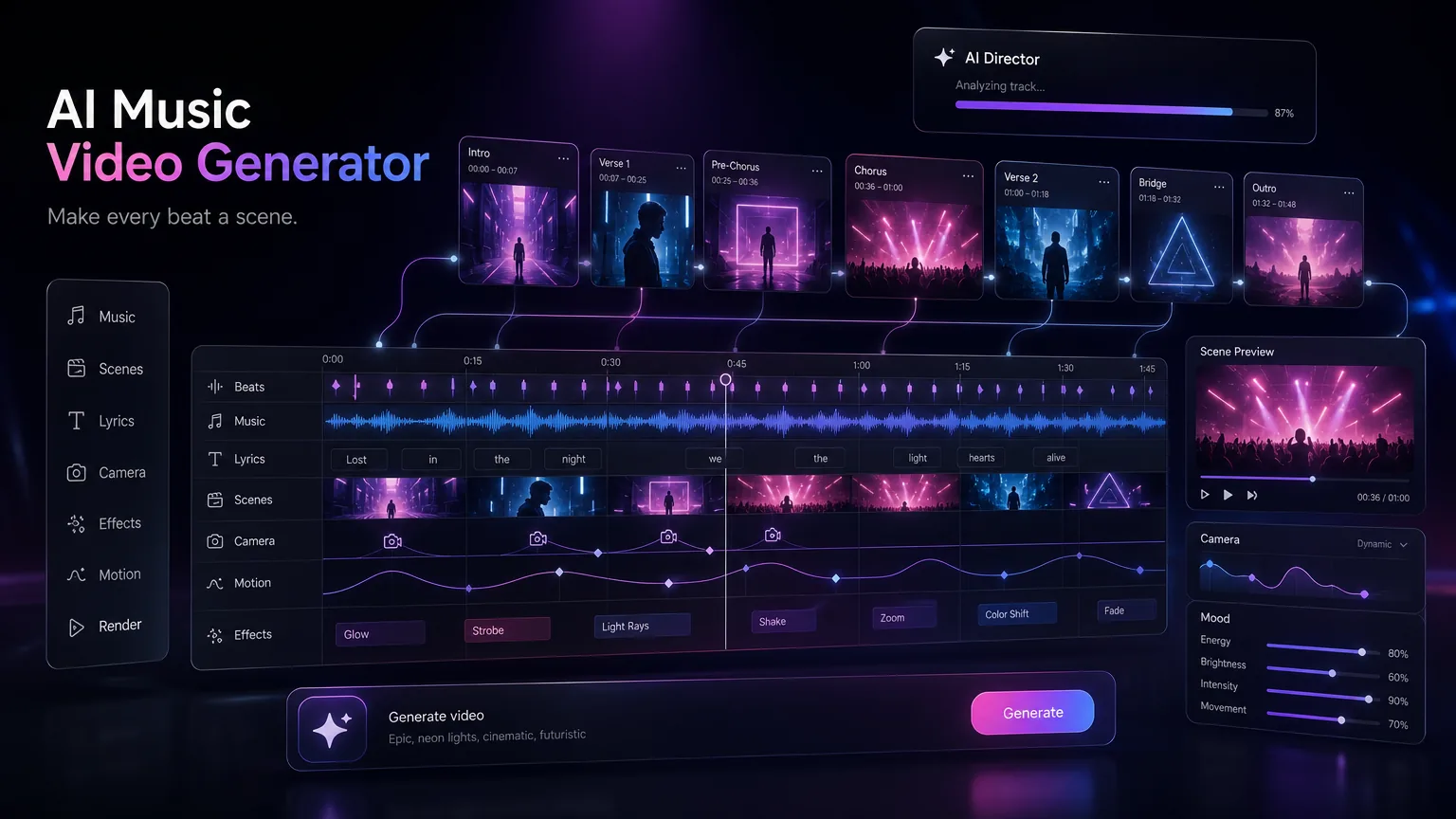
A strong AI music video is not just random visuals attached to audio. It needs scene planning, pacing, visual consistency, and platform-aware export choices.
Before you start
Choose the video job before writing visual prompts.
Match cuts and motion intensity to song sections.
Use a consistent performer, palette, and world.
Create different exports for Shorts, Reels, YouTube, and landing pages.
Practical workflow
Use the guide as a repeatable production pass
This guide is organized around the same steps a creator needs before opening the matching tool: define the input, control the model, review the result, then change one variable at a time.
Map the song before creating scenes
Create a reusable visual bible
Export for the platform
Write scene prompts that match musical function
Field-tested prompt patterns
Hook-first visual
Short music clip
Create a music video scene for the chorus of a [mood] song. Visual motif: [object or place]. Camera: [movement]. Color palette: [colors]. Cut rhythm should match the hook, with no readable text on screen.
Verse-to-chorus arc
Full visual direction
Plan three scenes: intimate verse, brighter pre-chorus build, wide chorus release. Keep the same character, lighting logic, and symbolic object across all scenes.
Lyric visualizer
Creator upload
Create a clean lyric visualizer background for [song mood]. Use abstract motion, readable negative space for English text overlays, and avoid busy faces or hands.
Quality bar
Do not approve the draft until it passes these checks
Song structure
The visual plan maps verse, chorus, bridge, or drop to specific scene energy.
Motif consistency
One object, color, or place repeats so the video feels connected.
Edit safety
Shots leave room for cropping, captions, and platform-specific aspect ratios.
No text artifacts
Generated frames avoid random unreadable text unless English text is intentionally designed later.
Audio match
Cut density and camera energy match the actual song section, not just the genre.
Map the song before creating scenes
Start by marking the intro, verse, chorus, bridge, and outro. Each section can have a visual role. The intro establishes the world, the verse builds story, the chorus delivers the strongest image, and the bridge adds contrast.
This prevents the video from feeling like disconnected clips. Even simple lyric videos work better when the strongest visual moment arrives with the strongest musical moment.
Next step: AI music generator — Create a stable song draft and soundtrack before planning the visuals.
Create a reusable visual bible
Write down the color palette, character style, camera mood, location, and lighting. Use those words consistently across prompts. If every scene changes style, the video may look generated rather than directed.
For music brands, this visual bible can become part of a release system across singles, teasers, and cover art.
Next step: AI songs for YouTube videos — Plan music, intros, and background cues for creator videos.
Export for the platform
A wide YouTube video, a vertical Reel, and a square ad need different framing. Plan important faces, titles, and motion inside safe areas. Short-form platforms need the hook immediately, while long-form videos can build atmosphere.
Next step: AI background music for videos — Build edit-friendly music beds that support scenes and voiceover.
Write scene prompts that match musical function
Each scene should have a job. An intro prompt can establish location, a verse prompt can show narrative detail, a chorus prompt can deliver the strongest visual metaphor, and a bridge prompt can shift color or camera movement. This makes the video feel edited to the song instead of assembled from unrelated clips.
Prompt fields should include subject, setting, lighting, camera movement, color palette, and emotional intensity. Keep those fields consistent across scenes unless the song section intentionally changes mood.
Use stronger motion in choruses than verses.
Keep performer styling consistent across scenes.
Put title-safe text areas in vertical exports.
Next step: commercial rights for AI music — Review licensing before publishing visuals with generated songs.
Support the video with indexable page content
A video alone is not enough for a release package. Add a clear title, lyric excerpt or transcript, cover image, short description, and links to the song or campaign page so viewers understand the project quickly.
For a blog article, the goal is to answer planning questions before the reader opens the generator. Once the page explains section mapping, prompt consistency, and export choices, the product link feels useful rather than forced.
Create image assets before motion when consistency matters
For artist visuals, cover art, and repeated characters, generate or select still images first. A still frame can define the face, outfit, palette, lighting, and world before video motion adds complexity. This reduces the chance that every clip looks like a different project.
Once the still direction is approved, write motion prompts that preserve those visual rules. This workflow is useful for landing pages because the same image language can support article hero art, social previews, and video scenes.
Approve palette and character style before generating many clips.
Reuse the same visual nouns across scene prompts.
Export a strong still frame for OG and article images.
Frequently asked questions
Do I need a finished song first?
A finished or near-final song helps because section timing affects pacing, scene order, and export length.
Are lyric videos useful for releases?
Yes. They give a song a visual identity when a full performance video is not available, especially if the title, lyrics, and description are clear.
Should I use one image style?
Yes. Consistent palette, character style, and lighting usually make AI video feel more intentional.