AI Vocal Remover vs Stem Splitter: Which Tool Should You Use?
Compare AI vocal remover and stem splitter workflows for karaoke, remixes, practice tracks, acapellas, drums, bass, and instrument stems.
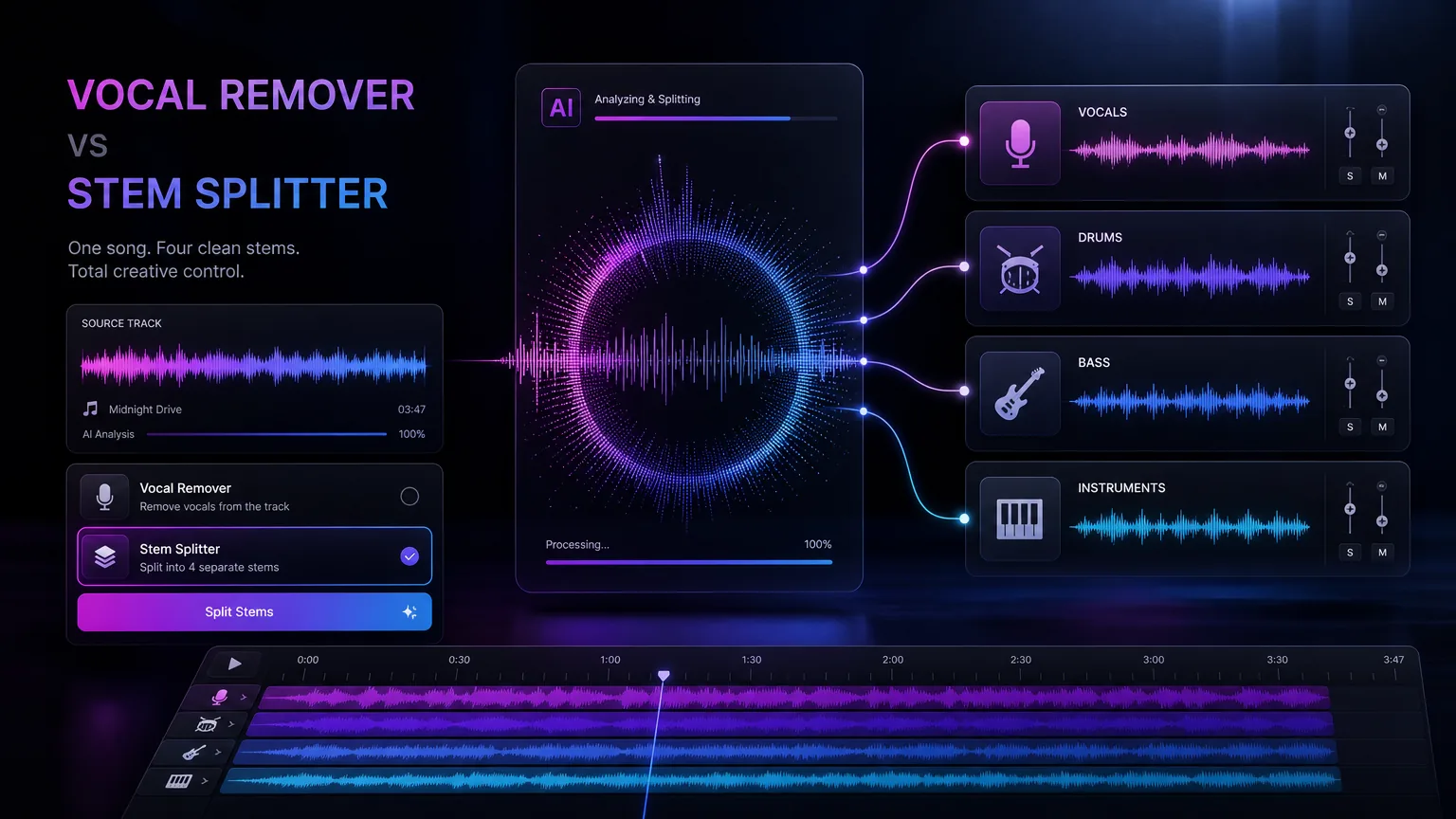
Both tools separate audio, but they solve different jobs. Vocal removers create karaoke and acapella outputs, while stem splitters give deeper control over drums, bass, vocals, and instruments.
Before you start
Use vocal remover when you only need vocals and instrumental.
Use stem splitter when remixing or practicing individual parts.
Clean source audio produces cleaner separation.
Export naming and storage matter for future editing workflows.
Practical workflow
Use the guide as a repeatable production pass
This guide is organized around the same steps a creator needs before opening the matching tool: define the input, control the model, review the result, then change one variable at a time.
The simple difference
Choose by output, not by tool name
How to improve separation quality
Check artifacts before choosing a workflow
Field-tested prompt patterns
Karaoke extraction
Need instrumental backing
Separate the lead vocal from this mix and prioritize a clean instrumental bed. Reduce vocal bleed in the chorus, preserve drums and bass punch, and avoid watery artifacts.
Remix stem prep
Need separate production layers
Split this track into vocals, drums, bass, and other instruments. Prioritize timing accuracy and transient clarity so the stems can be rearranged in a remix session.
Podcast cleanup
Speech over music
Isolate speech as clearly as possible, reduce background music without dulling consonants, and keep the processed voice natural enough for editing.
Quality bar
Do not approve the draft until it passes these checks
Goal choice
Use vocal removal for karaoke or backing tracks; use stem splitting when separate mix elements matter.
Artifact check
Listen for watery vocals, smeared cymbals, missing bass, or chorus bleed.
Phase safety
Check stems together before editing to avoid hollow or unstable playback.
Rights awareness
Do not assume separated stems create new rights for copyrighted recordings.
Export naming
Name stems by source, date, and role so future edits remain traceable.
The simple difference
An AI vocal remover usually creates two outputs: vocals and instrumental. That is ideal for karaoke, acapella extraction, vocal practice, and quick remix sketches.
A stem splitter separates more layers, often vocals, drums, bass, and other instruments. It is better for producers who want to rebuild an arrangement, isolate rhythm sections, or study how a track is constructed.
Next step: AI vocal remover — Use this when the output target is an instrumental or acapella.
Choose by output, not by tool name
Start with the asset you need. If you want a backing track for singing, vocal remover is enough. If you want to mute drums, replay bass, or sample a clean instrumental layer, stem splitting is the better path.
For commercial releases, always check source rights before using separated material. Separation technology does not automatically grant rights to the original recording.
Next step: stem splitter — Use this when drums, bass, vocals, and instruments must be edited separately.
How to improve separation quality
Use the highest quality source you legally have. Avoid clipped audio, low bitrate files, heavy crowd noise, and recordings with extreme reverb. The cleaner the source, the easier the model can identify musical layers.
After separation, listen for artifacts before publishing. Some outputs work well for practice but need extra cleanup before release.
Use WAV or high bitrate MP3 when possible.
Avoid live recordings for first tests.
Keep separated files named by song, date, and stem type.
Next step: AI song cover guide — Check vocal style and rights before using extracted or reference vocals.
Check artifacts before choosing a workflow
Audio separation is never only about the button you press. Listen for watery cymbals, ghost vocals, pumping ambience, missing bass transients, and reverb tails that follow the wrong stem. Those artifacts determine whether the file is ready for karaoke, remixing, transcription, or only private practice.
This evaluation step matters because creators need to know what good output sounds like. A practical workflow checks both the tool choice and the quality after export.
Use headphones for the first artifact pass.
Check quiet sections where bleed is easier to hear.
Keep the original file next to exported stems for comparison.
Next step: commercial rights for AI music — Review source ownership before reusing separated material commercially.
Use separated stems inside a bigger music workflow
Separated vocals can become a reference for an AI cover, a practice track, or a remix sketch. Isolated drums can help producers study groove. Bass stems can support transcription. The best page links each of those next steps to the correct tool instead of treating separation as the final destination.
That creative chain connects related audio jobs: remove vocals, split stems, make covers, convert audio to MIDI, and understand commercial rights. Each step should produce a file that is ready for the next task.
Decide whether the output is for learning or publishing
A practice file can tolerate small artifacts if it helps a singer rehearse, a drummer study groove, or a producer understand arrangement. A public remix, client edit, or monetized video needs a stricter review because artifacts and rights issues become more visible.
Before exporting, label the use case and quality bar. That keeps the article practical for beginners while still guiding advanced creators toward stem organization, legal review, and cleaner source files.
Frequently asked questions
Can I remove vocals completely?
AI can get very close, but artifacts may remain depending on the mix, source quality, and reverb.
Is a stem splitter better than a vocal remover?
Not always. It is more flexible, but if you only need karaoke or acapella, a focused vocal remover is faster.
Can I monetize separated stems?
Only if you have the necessary rights to the original recording and any new derivative work.