Text to Song Workflow: From One Idea to a Release-Ready Draft
Use this text-to-song workflow to turn a short idea into lyrics, melody, vocals, arrangement notes, revisions, and export decisions.
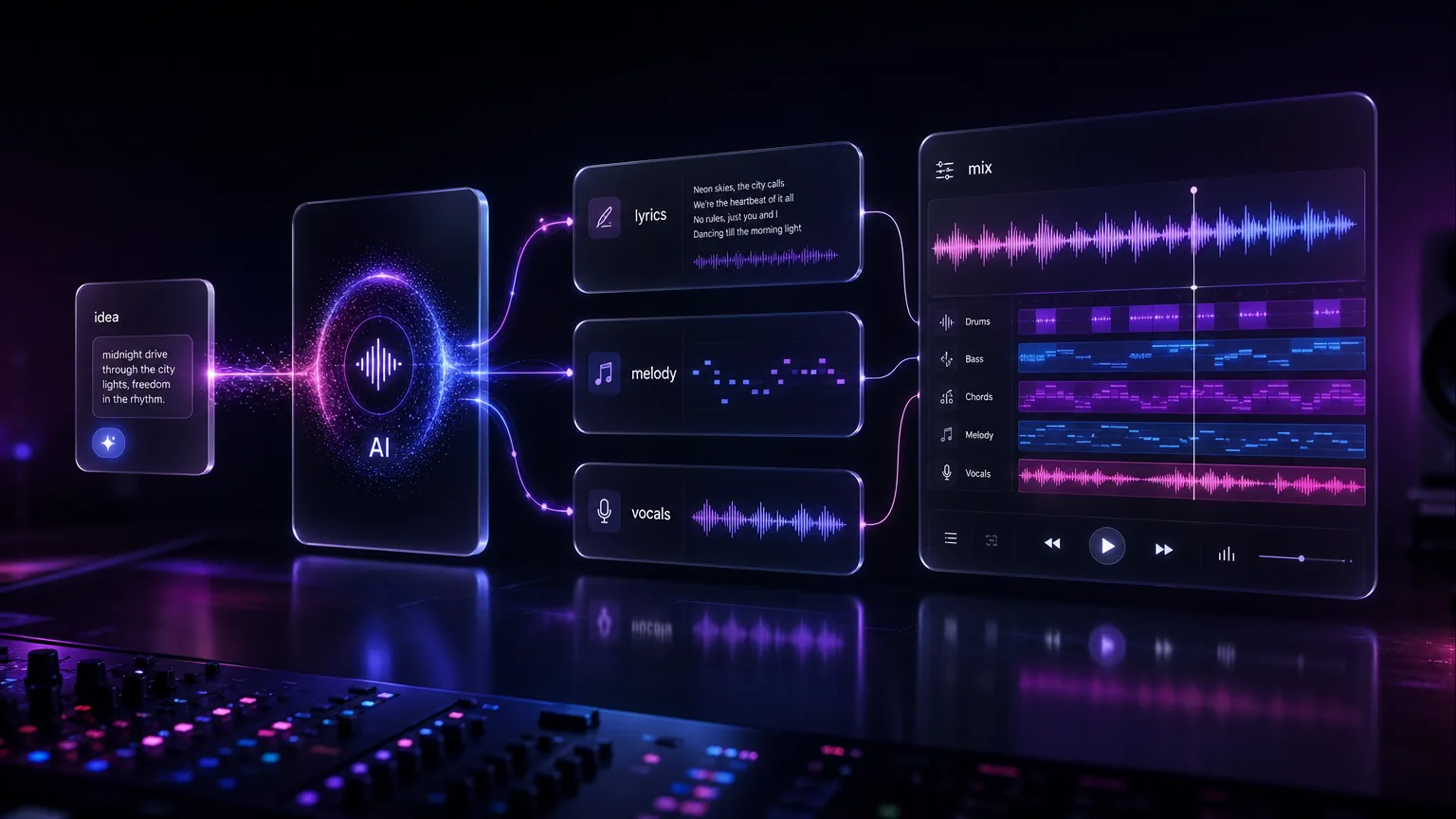
Text-to-song works best when the idea becomes a brief, the brief becomes a song structure, and the first draft becomes material for revision. This guide gives a clean workflow for creators who do not have lyrics yet.
Before you start
Start with a one-line creative brief.
Pick one listener moment and one emotional arc.
Generate short drafts before full-length songs.
Move from idea to tool only after the creative brief is clear.
Practical workflow
Use the guide as a repeatable production pass
This guide is organized around the same steps a creator needs before opening the matching tool: define the input, control the model, review the result, then change one variable at a time.
Define the song before writing the song
Generate a short proof before a full song
Turn feedback into prompt changes
Export with the final channel in mind
Field-tested prompt patterns
Idea to chorus
No lyrics yet
Create a [duration] [genre] song from this idea: [one-sentence idea]. Audience: [listener]. Emotional arc: start [feeling], end [feeling]. Write simple lyrics, a memorable chorus, and a clean outro.
Campaign draft
Brand or product music
Create a clean [mood] song for [brand moment]. Avoid explicit language, keep the hook usable in a 15-second edit, use [instrument palette], and make the chorus easy to cut under voiceover.
Second draft control
Draft is too generic
Regenerate with more specific imagery about [scene], less generic emotion words, a tighter pre-chorus, and a chorus that repeats [key phrase] naturally.
Quality bar
Do not approve the draft until it passes these checks
One idea
The brief has one listener moment, not five unrelated concepts.
Audience fit
Tempo, vocal tone, and lyric language match where the track will be heard.
Draft length
Short drafts are used before spending time on full-length versions.
Hook timing
The main hook appears early enough for social, ad, or intro use.
Export readiness
The prompt includes clean ending, intro length, and mix density when the song will be edited.
Define the song before writing the song
A text-to-song prompt should answer four questions: who is the listener, what moment are they in, what emotion should the song carry, and what format will the song be used in. A workout hook and a wedding anniversary song need different structure even if both are upbeat.
Once those choices are clear, describe the sound in concrete language. Include tempo feel, instruments, vocal tone, and whether the track needs a fast hook or a slow build.
Next step: text to song generator — Turn the cleaned idea brief into the first audible song draft.
Generate a short proof before a full song
A short proof helps you test style and hook direction quickly. Ask for a 30 to 60 second version first when the idea is uncertain. If the chorus works, expand it into a full song with verses, bridge, and ending.
This keeps credits and review time under control. It also prevents the common mistake of producing a full track from a vague prompt and then trying to fix everything at once.
Next step: AI lyrics generator guide — Use this when the idea is strong but the lyric language is weak.
Turn feedback into prompt changes
After the first draft, describe the problem rather than rewriting the whole prompt. Examples: make the drums lighter, bring vocals forward, simplify the chorus, add a four-bar instrumental intro, or make the mood less sad.
One change per generation gives you clearer learning. If you change genre, lyrics, vocal style, and tempo together, you will not know which instruction improved the output.
Next step: AI song prompt guide — Use this to tighten style and vocal constraints before generation.
Export with the final channel in mind
A song for TikTok needs a hook early. A podcast intro needs a clean ending and room for a voiceover. A background loop needs less vocal attention. Decide the distribution channel before final export so the arrangement supports the job.
Next step: music video generator guide — Plan visuals once the song draft has a stable hook and mood.
Add a revision log for repeatable results
Treat every generated track as an experiment. Keep a short revision log with the original idea, the prompt, what worked, what failed, and the next instruction. This helps you learn which phrases consistently produce better hooks, vocals, and arrangements.
A revision log is also useful when teams create music for many channels. The social media editor, founder, and audio editor can see why a prompt changed instead of starting over from memory.
Record the initial brief and final prompt.
Write one reason for every regeneration.
Keep approved style phrases for future campaigns.
Turn one idea into a content cluster
One text-to-song idea can become a full publishing asset: the final song, a short video hook, a behind-the-scenes prompt article, a lyric page, and a product demo. That is why the workflow belongs in the blog instead of only inside the generator UI.
This keeps the workflow grounded. A short idea becomes a brief, the brief becomes a draft, and the draft becomes something you can revise instead of a vague request that produces random music.
Frequently asked questions
Is text-to-song different from lyrics-to-song?
Yes. Text-to-song starts from an idea and can generate lyrics. Lyrics-to-song starts from finished words and focuses on arrangement and vocals.
What is the best length for a text-to-song draft?
Start with 30 to 60 seconds for style testing, then expand to a longer version after the hook and mood work.
Can I use text-to-song for ads?
Yes, but check the commercial rights of the plan and keep the brief specific to the campaign, audience, and platform.